Pilates on the Speediance Gym Monster works with bands instead of a weight number. You pick colored bands, the machine adds up the resistance, and you turn it on. That is a lot of tapping when you are lying on the platform with your feet in the straps. GMVoice lets you do all of it by voice.
How Pilates bands work on the Gym Monster
In Pilates mode the Gym Monster shows six bands. Each color stands for a maximum resistance:
- Yellow: up to 4.5 kg
- Pink: up to 6.5 kg
- Blue: up to 10 kg
- Orange: up to 11 kg
- Green: up to 13 kg
- Purple: up to 15 kg
You combine them like springs on a reformer. The same color can be picked more than once, and the total is the sum of every selected band. Nothing pulls until you turn the machine on.
The Pilates voice commands
GMVoice switches its command list to Pilates as soon as you are in a Pilates workout. There are four band commands, and each one takes as many colors as you want in one sentence:
- Add Band adds bands to the ones already selected. "Add Blue Band", or "Add Yellow Yellow Blue Orange Band".
- Remove Band takes bands away. "Remove Blue Band".
- Set Bands clears everything and selects exactly what you say. "Set Pink Blue Orange Band".
- Remove All Bands clears the selection.
Then Turn On engages the resistance and Turn Off releases it. Flip Screen, Skip Step, Pause, Next Screen and Previous Screen work too, and 15 More Seconds works in guided Pilates workouts.
Does "band" sound odd in your language or get misheard? The word is a keyword you can change in the app to any normal word, so "Add Blue Koala" works just as well.
1. Pick your bands
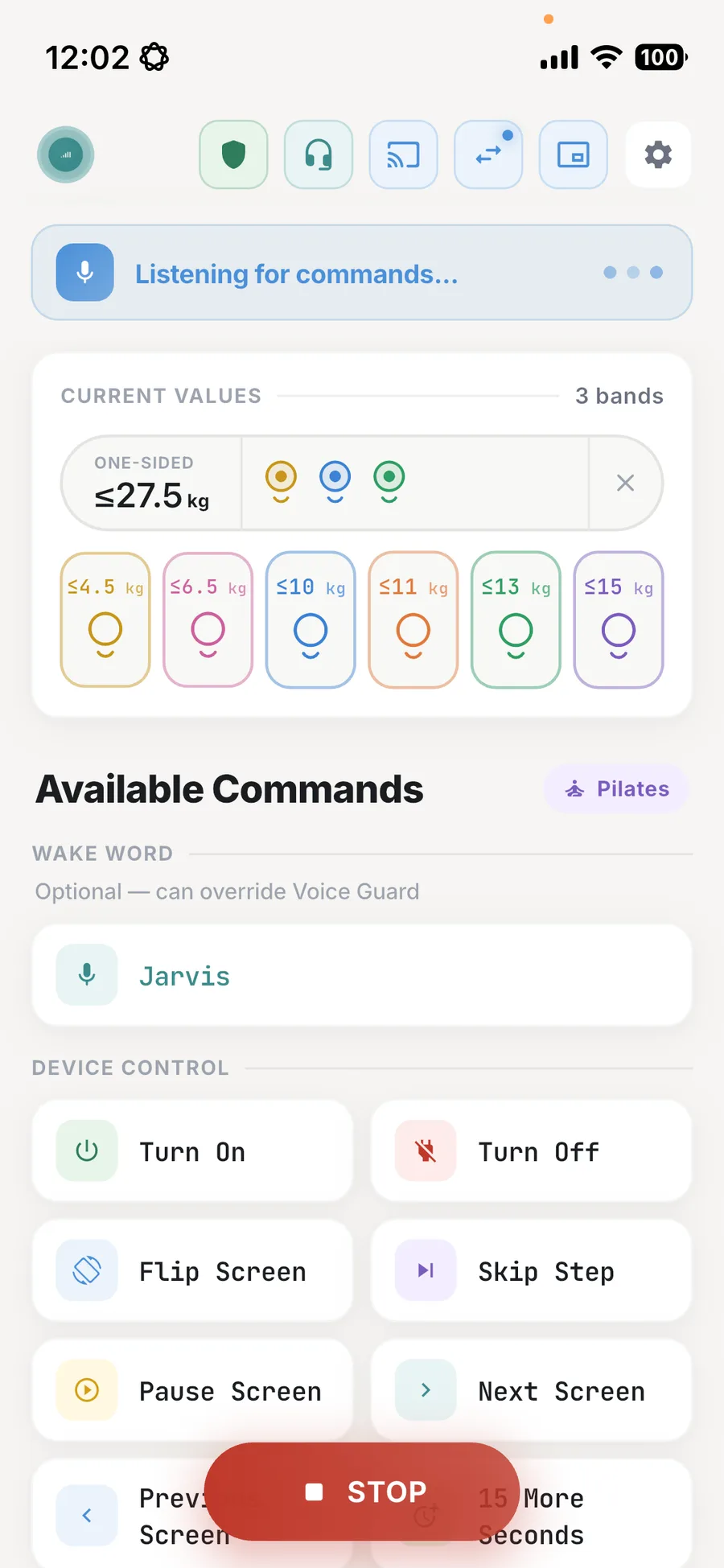
Say the bands you want. The phone shows the selected bands as colored markers next to the total, and the same bands are selected on the Gym Monster screen. Here yellow, blue and green add up to 27.5 kg, and the resistance is not engaged yet.
2. Say "Turn On"
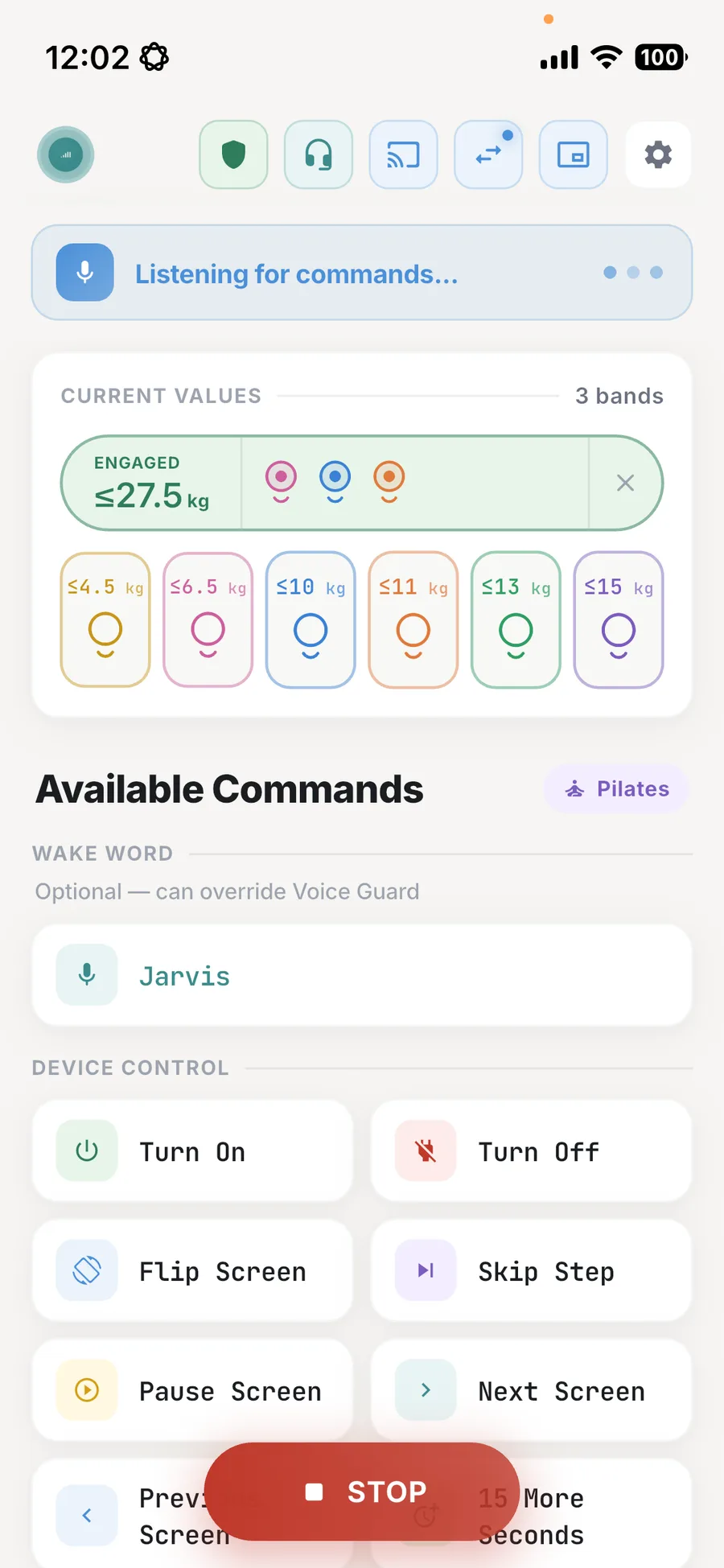
When you are in position, say Turn On. The panel turns green and reads ENGAGED. Want a different setup for the next exercise? Say Set with the new colors instead of removing bands one by one. In this example pink, blue and orange give the same 27.5 kg with a different mix.
Tips for Pilates with voice control
- Change bands between sets, not under load. Say Turn Off, change the bands, then Turn On again.
- Use Set for a new exercise. One sentence replaces the whole selection, so nothing stays selected from the previous exercise by accident.
- Keep the phone or a mic close. Lying down, your voice goes up to the ceiling. Earbuds or a clip-on mic help. The full voice command list covers the other training modes.
FAQ
Which Pilates band colors does the Speediance Gym Monster use?
Six colors, each with a maximum resistance: yellow up to 4.5 kg, pink up to 6.5 kg, blue up to 10 kg, orange up to 11 kg, green up to 13 kg and purple up to 15 kg. The same color can be selected more than once.
Which voice commands work in Pilates?
Add Band, Remove Band, Set Bands and Remove All Bands, plus Turn On, Turn Off, Flip Screen, Skip Step, Pause, Next Screen and Previous Screen. 15 More Seconds works in guided Pilates workouts. Pilates has no Turn Left, Turn Right or Cancel Command.
Can I add several bands with one command?
Yes. Name every color in one sentence, for example Add Yellow Yellow Blue Orange Band. Set works the same way but clears the current bands first.
Try GMVoice
Download the app, choose the mic setup you already have, and start training with your voice.
Related guides
- Speediance Gym Monster Accessories: 10 Worth Buying in 2026
- How to Connect AirPods or Bluetooth Headphones to Speediance Gym Monster (2026)
- How to Debug GMVoice Fast
Planning your next session? GM Manager builds Speediance workouts in your browser.