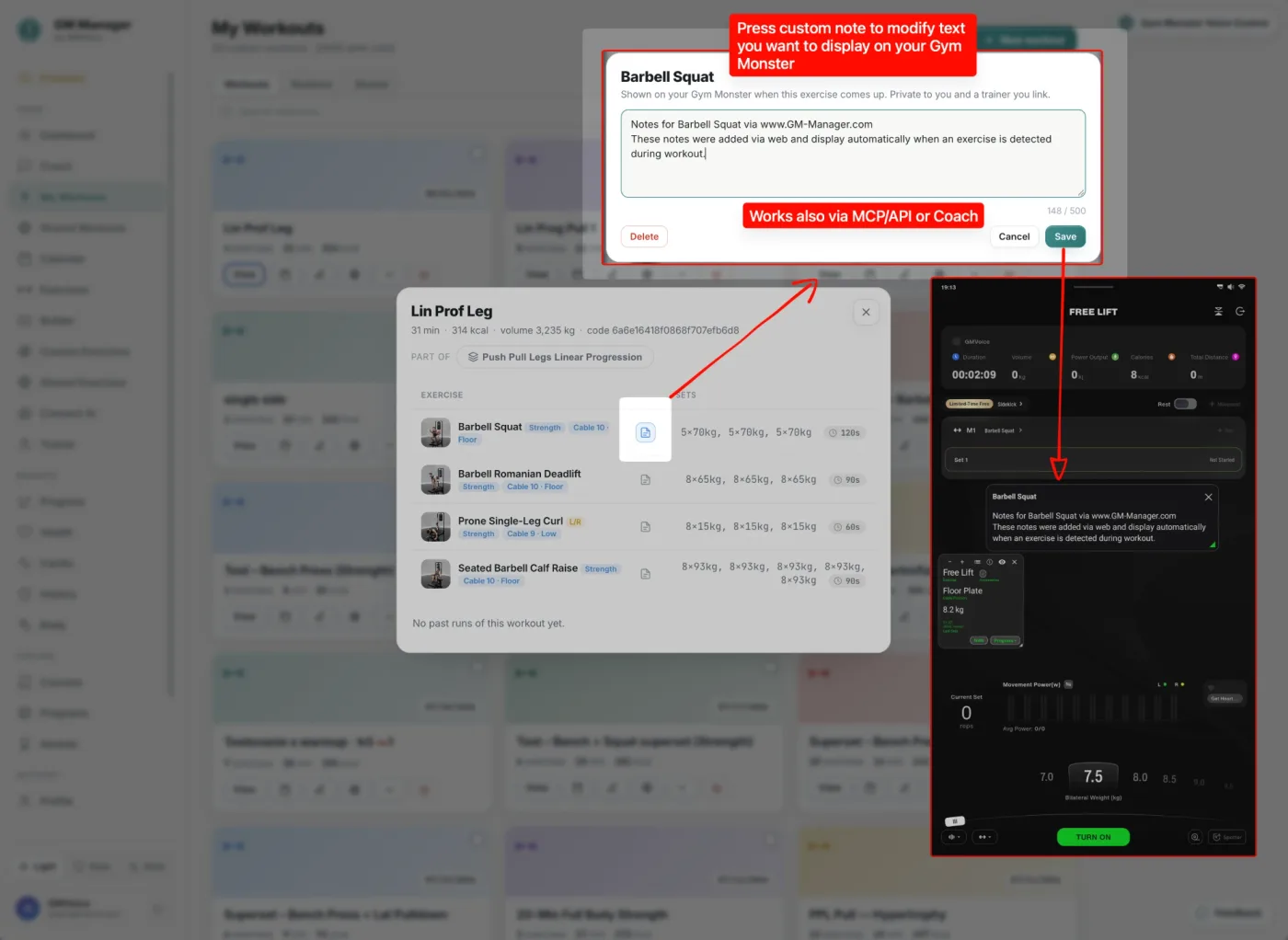
In GM Manager you can write a private text note for any exercise. When that exercise comes up during your workout, the note appears on the Gym Monster screen automatically: a form cue, a tempo, a reminder of what to focus on today. It works because GMVoice is connected to your Gym Monster.
What you need
- GMVoice on iPhone or Android, running and connected to the Gym Monster in Hybrid or Wi-Fi mode. Hybrid and Wi-Fi mode use the Dongle API on the Gym Monster.
- GM Manager in any browser, signed in with your Speediance account.
How to set a note on the web
- Open gm-manager.com and sign in.
- Find the exercise and click the note icon on it.
- Type your note in the editor and save it. A note can be up to 500 characters.
- Start the workout with GMVoice connected. When the exercise comes up, the note is on the Gym Monster screen.
Notes are private to you and a trainer you link. You can change or replace a note at any time, and the new text shows the next time that exercise comes up.
Let an AI agent write your notes
You do not have to type every note yourself. Notes can also be set through MCP or the API, or by the Coach in GM Manager. A Claude or Codex agent connected to your GM Manager can leave you a message for each training: what to focus on, what to keep in mind, or extra information about the exercise. The choice is yours: write it by hand, or let the agent do it.
What to put in a note
- A form cue you keep forgetting: elbows in, ribs down, pause at the bottom.
- A tempo or target for today, for example a slow eccentric or one rep in reserve.
- A reminder after an injury, or a message from your trainer.
FAQ
Do I need GMVoice to see exercise notes on the Gym Monster?
Yes. GMVoice must be running and connected to your Gym Monster in Hybrid or Wi-Fi mode. GM Manager stores the note, and GMVoice shows it on the Gym Monster screen when that exercise comes up in your workout.
How long can an exercise note be?
Up to 500 characters per exercise. The note is private to you and a trainer you link in GM Manager.
Can an AI agent write my exercise notes?
Yes. Notes can be set through MCP or the API, or by the Coach in GM Manager, so a Claude or Codex agent can leave a message on what to focus on or extra information for each training.
Try GM Manager and GMVoice
Set a note in your browser, train with GMVoice connected and read it on the Gym Monster.
Related guides
- Plan Speediance Workouts on Your Laptop: GM Manager Web App (Free)
- What Is the Dongle API? Faster, More Stable Gym Monster Commands
- Stream Gym Monster Audio to Your Headphones with GMVoice (Wi-Fi and Hybrid Mode)
Planning your next session? GM Manager builds Speediance workouts in your browser.