Happy summer, everyone. If you are anything like me, you enjoy tinkering with your training — building custom workouts, checking your calendar, and browsing the numbers your Speediance Gym Monster quietly collects every session. And if you have ever wished you could do all of that from a real browser instead of the tablet, I have something for you.
Say hello to GM Manager by GMVoice — a web app that opens your Gym Monster world in any browser, at gm-manager.com.
The overview of everything GM Manager does is on gm-manager.com/home.
Your Gym Monster, Now on the Web
The Speediance app on the tablet is great for training. But some things are just easier with a keyboard, a mouse, and a full-size screen in front of you. GM Manager is exactly that: a browser window into your own Gym Monster account. You log in with your existing Speediance credentials, and everything you already have is right there.
Once you are in, you can:
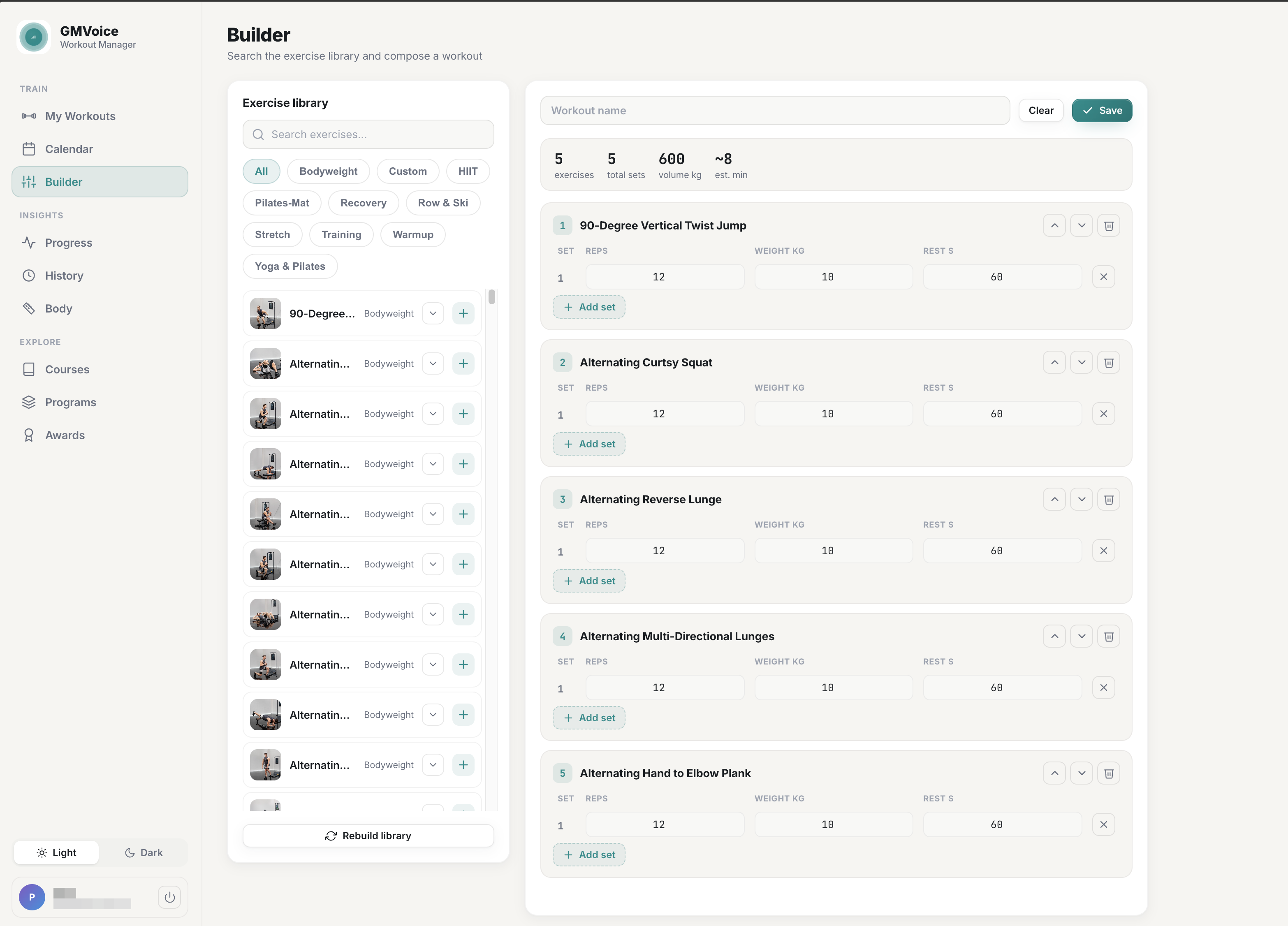
- Build and schedule custom workouts — search the exercise library and compose a session set by set.
- View your progress and workout history — see what you have done and how you are trending over time.
- Track body measurements — keep your body data in one place.
- Explore courses and programs — browse the content already available to you.
- Check your awards — the badges and milestones you have earned.
All of it lives behind a clean sidebar and works directly in your browser — no install, no extra account, nothing new to learn.
GM Manager does not replace your Gym Monster — it gives you a second, more comfortable door into the same data. Plan on the web, train on the machine.
Building Custom Workouts, Finally the Easy Way
This is the part I am most excited about. Anyone who has tried to assemble a custom workout by tapping through a touchscreen knows the pain: scrolling endless lists, poking at tiny number fields, losing your place. On the web it is a completely different experience.
In the Builder, you get a searchable exercise library on the left and your workout taking shape on the right. Add an exercise, then set the reps, weight, and rest for each set with a real keyboard. Add another set with one click. Reorder exercises, name the session, and save it. GM Manager even tallies your exercises, total sets, volume, and estimated time as you go, so you can see the shape of the session before you ever step up to the machine.
That is the whole point: your data is accessible on the web, and custom workouts are genuinely easy to build. Put together a full week of training on your laptop in the time it used to take to thumb through one workout on the tablet.
TRY IT IN 30 SECONDS
1. Open gm-manager.com and log in with your Speediance account.
2. Go to Builder, search the library, and add a few exercises.
3. Set your reps, weight, and rest, save the workout, and schedule it on your calendar.
Why Does It Exist?
Every tool I build comes from my own needs as a Gym Monster owner. I have been using a private version of GM Manager for a while now, and it quietly became part of how I train. Planning on a laptop, reviewing history over coffee, setting up the week ahead — it just fit the way I like to work.
So I decided to share a public version as a demo and proof of concept. It is the same idea I built for myself, now open for the rest of the community to try. If you have ever wanted a web version of Gym Monster, this is my attempt at it.
Your Data Stays Yours
Privacy is not an afterthought here, so let me be direct about it:
- GM Manager does not store your data.
- Your email and password are used only to communicate with Speediance on your behalf.
- The web app simply displays your own data back to you — nothing is kept, sold, or shared.
In other words, it is a window, not a warehouse. When you close the tab, there is no copy of your training sitting on some server somewhere.
Note: GMVoice is an independent project and is not affiliated with Speediance. GM Manager talks to your Speediance account only to show you your own data.
Where This Could Go Next
Right now GM Manager is a demo — but if people find it useful, it could be just the beginning. A few ideas I am already turning over:
- Sync your data and progress to services like Strava, Google Health, and others.
- Export your data so it is yours to keep and analyze however you like.
- An open API to create and schedule custom workouts from third-party tools — imagine pointing an AI agent at it to build, pre-populate, and schedule a workout for every day of your week.
- Phone-based sync where GMVoice could use GM Manager on your phone to push data to other apps.
None of this is promised yet. Which brings me to the reason this version is public at all.
I Need Your Feedback
This is a proof of concept, and honestly, whether it grows depends on you. If you find GM Manager useful — even in a small way — I would love to hear about it. And if there is no interest, I will most likely take it down rather than waste resources keeping it running.
So give it a try, tell me what works and what does not, and if it helps you, share it with another Gym Monster owner. That is the single best way to make sure this becomes more than a demo.
While you are exploring the GMVoice world, you might also like the story of why I built GMVoice in the first place — it comes from the same place: solving my own Gym Monster problems and sharing the result.
Frequently Asked Questions
What is GM Manager?
It is a web app by GMVoice that opens your Speediance Gym Monster data in any browser. You can build and schedule custom workouts and view your progress, history, body measurements, courses, programs, and awards — all from your laptop or phone browser.
Do I need to install anything?
No. GM Manager runs entirely in your browser at gm-manager.com. You log in with your existing Speediance account — there is nothing to download.
Does GM Manager store my data?
No. Your email and password are used only to communicate with Speediance, and the app simply shows your own data back to you. Nothing is stored.
Does GM Manager work on Android?
Yes. GM Manager is a web app, so it runs in Chrome or any other browser on Android phones and tablets, iPhone, iPad, Windows and Mac. It does not replace the official Speediance app; it adds a bigger-screen workout builder and calendar on top of your existing Speediance account.
Why build custom workouts on the web instead of the tablet?
A browser gives you a full keyboard, a big screen, and a searchable exercise library, so setting reps, weight, and rest for each set is far faster than tapping it out on the Gym Monster touchscreen.
Open GM Manager
Log in with your Speediance account, build a custom workout on the web, and tell me what you think.
Related guides
- Why I Built GMVoice: From a Broken Bluetooth Ring to Hands-Free Voice Control
- Best Speediance Gym Monster Accessories (2026): Tested & Ranked
- GMVoice vs Gym Monster Ring: Honest Comparison After 6 Months (2026 Review)
- Show Your Own Exercise Notes on the Gym Monster Screen with GM Manager
Planning your next session? GM Manager builds Speediance workouts in your browser.