If you love GMVoice, you probably want the same thing I do: every command instant, every weight change immediate, and a connection that never wobbles in the middle of a set. Wi-Fi gets you most of the way there — but there is a small, optional helper that takes the last step. It is called the Dongle API, and once you understand what it does, you will probably want it running on your Gym Monster.
Let me explain what it is, how it works, and why it makes such a noticeable difference.
What Is the Dongle API?
The Dongle API is a small helper app that runs quietly in the background on your Speediance Gym Monster. You do not open it, you do not interact with it, and you will barely know it is there. It has exactly one job: help your Gym Monster send live data to the GMVoice app faster and more reliably.
That is really all it is — a lightweight background service on the machine that acts as a fast lane for the data flowing between your Gym Monster and your phone.
The Dongle API is not the dongle. The GMVoice dongle is the small piece of hardware you plug into your Gym Monster. The Dongle API is software — a background helper on the machine. They are different things that happen to work beautifully together.
This distinction trips people up, so it is worth saying plainly. The names are similar, but one is hardware and one is software:
- The GMVoice dongle — a tiny device you plug into your Gym Monster for the lowest latency and dongle-only ring actions. You can order one here or build your own.
- The Dongle API — a small app on your Gym Monster that speeds up the data connection to GMVoice, whether or not you own a dongle.
How the Dongle API Works
There are two ways the Dongle API helps, depending on your setup.
1. Over Wi-Fi — a faster live connection
Even without any extra hardware, the Dongle API speeds things up. Your commands still travel over Wi-Fi, but the helper streamlines the live-data exchange between your Gym Monster and GMVoice. You will feel it most in the parts of the app that read your machine constantly — the Current Values section refreshes quicker, and weight changes register a little snappier.
2. With a dongle — bypassing Wi-Fi entirely
This is the big one, and it is the main reason the Dongle API exists. If you have a GMVoice dongle plugged in, you can flip the Dongle API toggle in GMVoice settings. From that moment, every command routes straight through the dongle instead of your Wi-Fi network.
That means a direct link between your Gym Monster and your phone, with no router in the middle. Your commands no longer depend on your home network being fast, uncongested, or even stable. And because none of that traffic crosses your Wi-Fi network, the connection is more secure, too. The one exception is screen mirroring, which keeps using Wi-Fi — everything else (weight changes, turning the machine on and off, live values, and the rest) flows through the dongle.
In one sentence
On Wi-Fi, the Dongle API makes your existing connection faster. With a dongle, it lets your commands skip Wi-Fi and your router completely and talk straight to your phone — fast, direct, and dependable.
What You'll Actually Notice
Technical explanations are nice, but here is what the difference feels like in a real session. These are the things I noticed the moment I switched everything over to the dongle:
- "Set X pounds" responds faster. Weight-change commands come back noticeably quicker.
- The Current Values section is snappier. The live readout in the app updates with less lag.
- The connection is rock-solid. Because it is a direct link between your Gym Monster and your phone — no router involved — it is far more stable. My Gym Monster's Wi-Fi occasionally resets mid-workout, and the direct dongle link sidesteps that problem entirely.
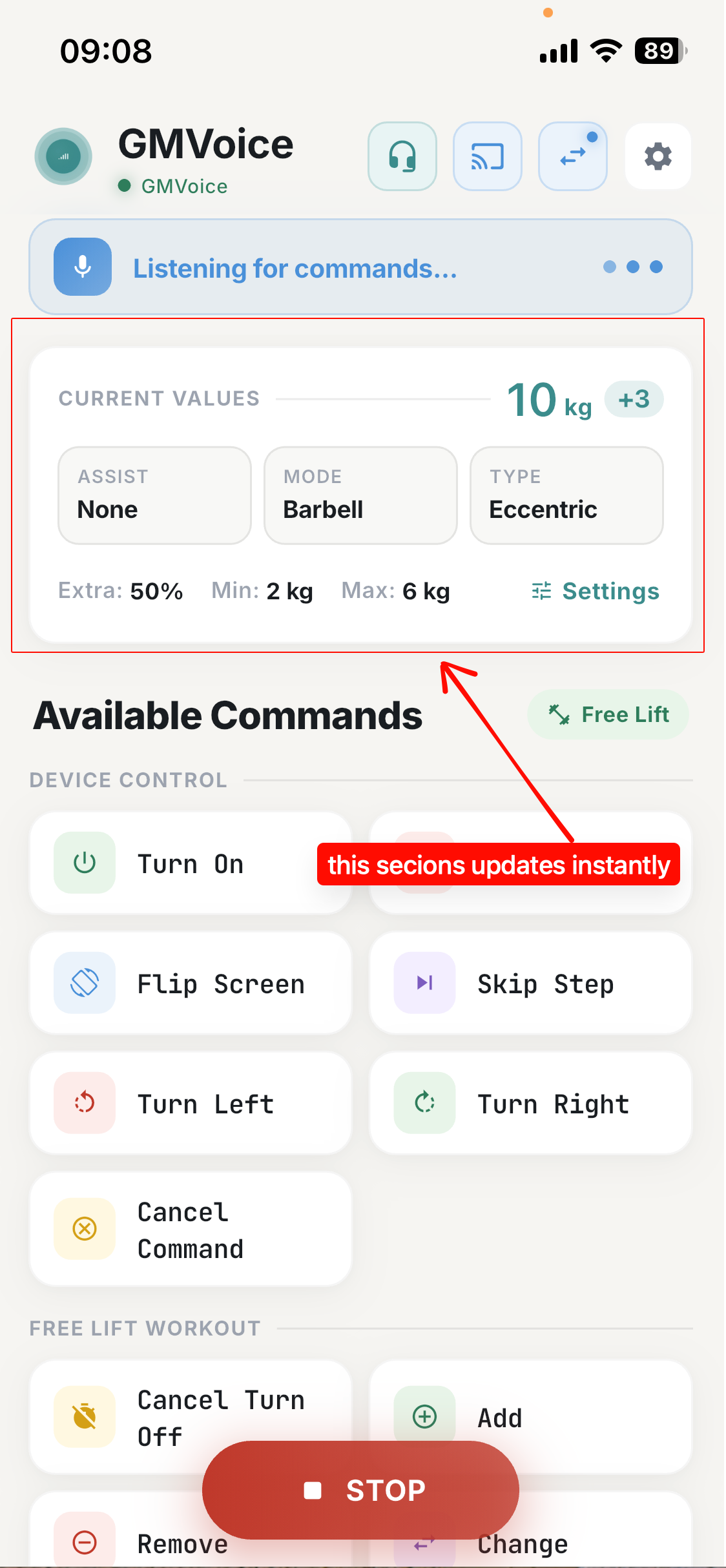
I genuinely like Wi-Fi, and for a lot of people it is perfectly good. But Wi-Fi can add small delays, and it depends on your router behaving itself. Every now and then a command would arrive a beat late because of a network hiccup. The dongle plus the Dongle API removes those variables — the result is a setup that just feels fast and dependable, set after set.
Is It Safe to Install?
Short answer: yes. I know that installing something onto your Gym Monster can sound intimidating, so let me be direct about it.
- The Dongle API is just a small Android app that runs in the background on your Gym Monster.
- It does not change or break anything on the machine — it only helps send data to GMVoice faster.
- You can uninstall it at any time, and your Gym Monster goes right back to how it was.
It is a helper, not a modification. Nothing about your Gym Monster's own software is touched.
How to Install the Dongle API
You do not have to hunt for downloads or sideload anything manually. The Dongle API installs directly from GMVoice — while you are connected over Wi-Fi, open Settings and you will find it in the Bluetooth Receiver section. Here is exactly where it lives:
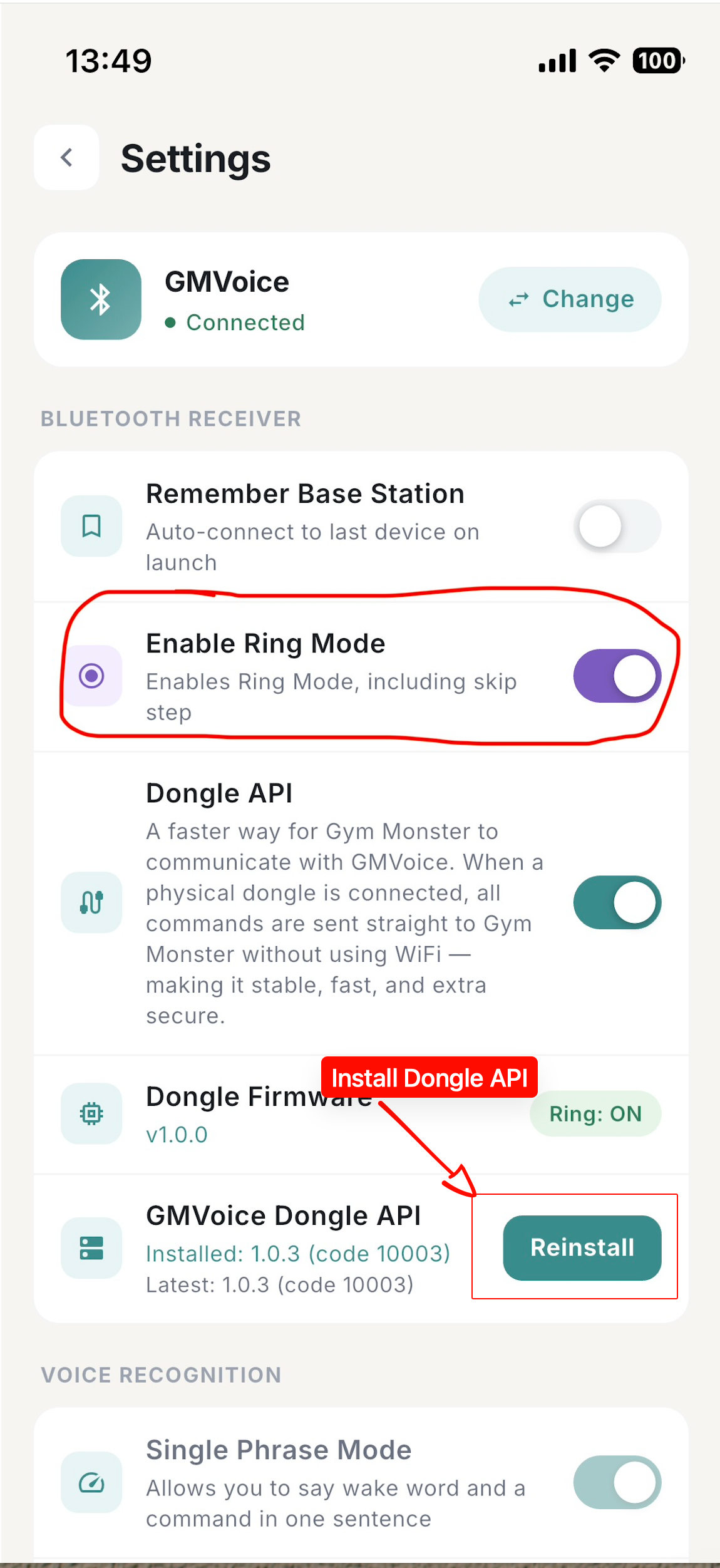
Set it up in about a minute
1. Connect GMVoice to your Gym Monster over Wi-Fi as usual.
2. Open GMVoice Settings, find the GMVoice Dongle API row in the Bluetooth Receiver section, and tap Install — it lands on your Gym Monster in the background.
3. Have a dongle? Plug it in and flip the Dongle API toggle in Settings to route every command (except screen mirroring) through it.
Should You Turn It On?
Here is my honest recommendation, depending on where you are:
- If you have a GMVoice dongle: yes, absolutely. Install the Dongle API and switch the toggle on. This is the fastest, most stable configuration GMVoice can offer, with everything but screen mirroring flowing through the dongle.
- If you are on Wi-Fi only: it is still worth installing. You will get a quicker Current Values readout and snappier weight changes, with nothing to lose.
Either way, it is completely optional and completely reversible. Try it for a few workouts and see whether your setup feels faster — I am confident it will.
If you are still deciding whether a dongle belongs in your setup, the DIY start guide walks through what to buy and what to skip. And if you are curious where all of this came from, the story of why I built GMVoice explains the itch every one of these features is scratching.
Frequently Asked Questions
What is the Dongle API?
It is a small helper app from GMVoice that runs in the background on your Speediance Gym Monster. It helps your Gym Monster send live data to the GMVoice app faster and more reliably, so commands respond quicker and your connection stays stable.
Is the Dongle API the same as the GMVoice dongle?
No. The GMVoice dongle is a piece of hardware you plug into your Gym Monster. The Dongle API is software — a background helper app on the machine itself. With a dongle, the Dongle API can route every command except screen mirroring straight through the dongle, bypassing your Wi-Fi and router.
Do I need a dongle to use the Dongle API?
No. You can install and use it over Wi-Fi, where it still speeds up live data like the Current Values panel and weight changes. If you do have a dongle, turning on the Dongle API toggle routes all commands through it for the fastest, most stable connection.
Will installing the Dongle API break anything on my Gym Monster?
No. It is just a small Android app that runs in the background and helps send data to GMVoice faster. It does not change or break anything on your Gym Monster, and you can uninstall it at any time.
How do I install the Dongle API?
Directly from GMVoice. While connected over Wi-Fi, open GMVoice Settings and install the Dongle API — it lands on your Gym Monster in the background. If you have a dongle, flip the Dongle API toggle in Settings to route your commands through it.
Get the fastest GMVoice setup
Add a dongle, install the Dongle API, and let every command skip the router. Start with the app, then grab the hardware.
Note: GMVoice is an independent project and is not affiliated with Speediance. The Dongle API is a GMVoice helper that runs on your Gym Monster only to speed up communication with the GMVoice app.
Related guides
- How to Set Up GMVoice DIY: Flash Firmware on a Speediance Gym Monster Dongle
- How to Debug GMVoice Fast in 5 Steps, No Fluff
- GMVoice vs Gym Monster Ring: Honest Comparison After 6 Months (2026 Review)
Planning your next session? GM Manager builds Speediance workouts in your browser.